Create Multiple Electronic Invoicing Addresses for a French Contact
Organizational Units (OU) – Services and Service Codes
Overview
For a French company with multiple electronic invoice receiving addresses, you can create sub-contacts (organizational units) linked to the same main contact.
This procedure applies regardless of the country of your ABCinvoice account (France, Belgium, or elsewhere), as long as the contact is a French company.
Note: The organizational units described here only concern your customer contacts, not the organizational units associated with your own ABCinvoice account.
1. Create the Main Contact
Start by creating the company’s main contact using its SIREN (9-digit number).
This contact will serve as the main reference for linking the different electronic invoicing addresses.
2. Add Sub-Contacts (OU)
If your customer has multiple invoice receiving addresses, add the corresponding sub-contacts under the main contact.
Depending on the information provided by your customer, an organizational unit can be identified by:
- SIREN + suffix
- SIRET
- SIRET + service name and service code
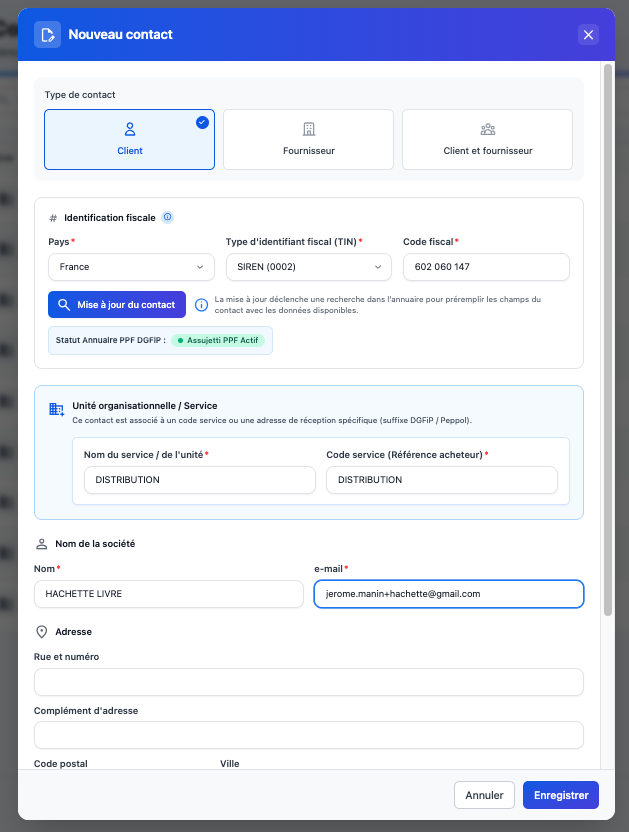
When creating the sub-contact, enter the required information, including the service name and service code (buyer reference), where applicable.
Illustration 1: Creating a sub-contact with a service code.
Once saved, the sub-contact appears under the main contact in your contact list.
Illustration 2: Displaying the sub-contact in the contact list.
3. Select the Recipient When Creating an Invoice
When creating an invoice, in the Customer field, select:
- The main contact (SIREN) to invoice the company directly.
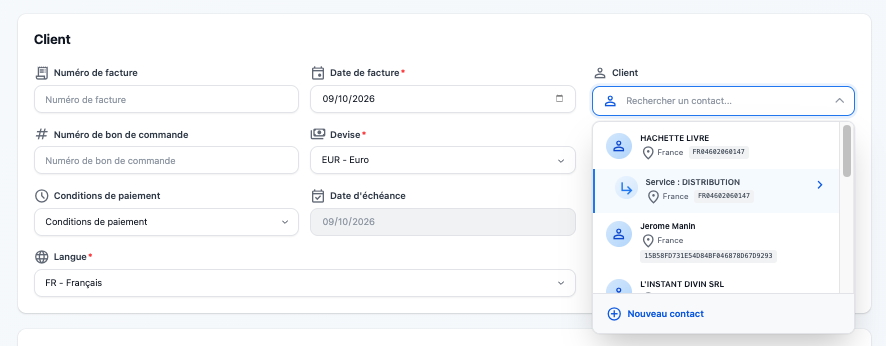
- The sub-contact (OU) to send the invoice to a specific establishment or department.
Illustration 3: Selecting a sub-contact when creating an invoice.
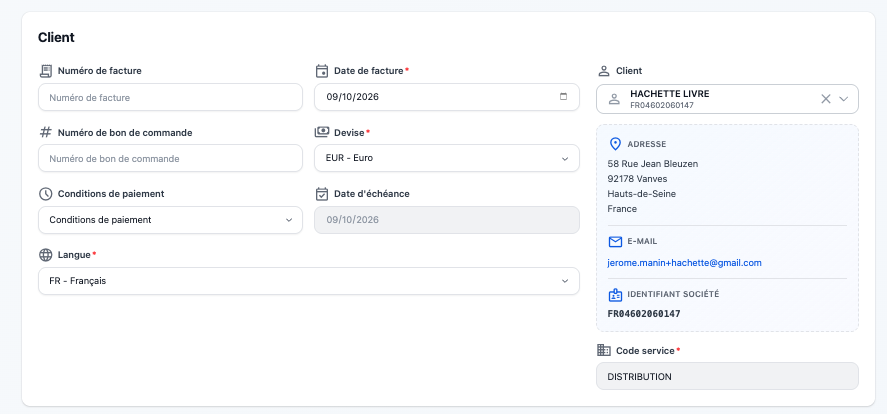
When you select a sub-contact, its service code is automatically populated in the invoice, if one has been entered.
Illustration 4: Automatic display of the service code associated with the sub-contact.
Key takeaway: A single main contact can have multiple electronic invoicing addresses. Simply create the necessary sub-contacts and select the appropriate recipient when issuing an invoice.

Was this article helpful?
That’s Great!
Thank you for your feedback
Sorry! We couldn't be helpful
Thank you for your feedback
Feedback sent
We appreciate your effort and will try to fix the article